Reversing Kid Cue on the iPhone Duo
Pulling Snoopy animations, an icon and a 13-colour palette out of an iPhone Duo firmware image, and rebuilding the halftone background the Camera app draws behind them.
The iPhone Duo’s Camera app has a mode called Kid Cue. You turn it on, and the outer display plays a Snoopy animation to keep a toddler looking at the lens while you take the photo. I wanted to know where those animations live, how the app draws them, and why my first extraction looked nothing like the phone.
Getting the Camera app out of the firmware
Everything starts with the restore image for iPhone19,4, iOS 27.2 (24B91020). It is a 13 GB zip, and I never unpacked it. I streamed what I needed straight out of the zip.
The system volumes inside are AEA-encrypted. The keys are wrapped in the image’s embedded auth data, and Apple’s key service unwraps them. I used aeota for that step. Then aea decrypt can read from a pipe:
unzip -p iPhone19,4_27.2_24B91020_Restore.ipsw '<root>.dmg.aea' \
  | aea decrypt -o rootfs.dmg -key-value "base64:$KEY"
Mounting the root volume turned up the first surprise. The Camera app is not in /Applications. It sits in /private/var/staged_system_apps/Camera.app. Inside is a ShutterBuddy_Assets folder, and that is where Kid Cue lives. ShutterBuddy is the internal name. The strings file gives it away:
Chrome.ShutterBuddy.Title    = "Kid Cue"
Chrome.ShutterBuddy.Subtitle = "Animations that grab attention."
CoverScreenInstruction.ShutterBuddy = "Kid Cue is turned on."
What is in the folder
There are 15 .heics files and one PNG:
balloons, bonk, brushingteeth, bubbles, fingerpaint, flyingace, happydance, magnifier, maskedmarvel, rocket, rollerskates, snoopyinspace, spraybottle, surfingsnoopy and tennis.
A .heics file is a HEIF image sequence. Each one is 1024×1024 at about 12 fps, 66 to 102 frames long, with transparency. ImageIO decodes them frame by frame. The container is also just HEVC video with a separate alpha track, so ffmpeg reads it fine.
The icon is not a loose file. kidque_icon is inside the CameraUI framework’s Assets.car catalog. The format is private, but the catalog can be read through CoreUI’s CUICatalog, or with the open-source carfile-go if you are not on a Mac.
The transparent problem
My first export looked wrong. Every animation was Snoopy on a transparent background, but on the phone each one sits on a solid colour with a fine dot pattern. A photo of the outer display from a hands-on review showed Snoopy in a purple mask over a purple field covered in halftone dots.
My first theory was that the dots belonged to the animation, so I measured them. The maskedmarvel frames have no dots at all. The pattern comes from somewhere else, and so does the colour.
ShutterBuddy_Assets has one more file, shutterbuddy_bg_template.png. It is 82×2160 and it is a single vertical halftone gradient: tiny dots at the top, growing until the bottom is solid black. I briefly wondered if it was a stack of animation frames. It is not. It is one continuous gradient.

Finding the code that colours it
None of this is in the Camera app binary, which is about 115 KB. The UI code is in CameraUI, and on current iOS that framework is not a file on the root volume. It is inside the dyld shared cache, which now ships in the system cryptex split across dozens of subcache files.
A plain grep -a across the cache shows which subcache holds the code, and strings on that file gives a readable log trail:
shutterBuddySupported=%d (keyOverride=%d isV68=%d)
ShutterBuddyAsset: could not find %s.heics in Bundle.main/ShutterBuddy_Assets
ShutterBuddyMediaManager: CAMFeatureDevelopmentShutterBuddyAsset=%ld is out of range 1...%ld, using the full rotation
ShutterBuddyMediaManager: Pinned to asset %s
ShutterBuddyMediaManager: Could not load shutterbuddy_bg_template.png
ShutterBuddyMediaManager: CIFalseColor failed for colorway %s
ShutterBuddyMediaManager: Picked session colorway %s
That is most of the design in seven lines. The app plays the animations in rotation, and a developer flag pins one. For the background, it loads the template, runs it through CIFalseColor for a colorway, and picks that colorway once per session. The support check also logs isV68, which reads like a hardware-board check, so I would not expect Kid Cue to show up on other phones just because they run the same OS.
CIFalseColor takes two colours and remaps a grayscale image onto them: black becomes the first, white becomes the second. With a black-dots-on-white template, that gives you a background colour and a dot colour.
Pulling the framework out
With ipsw dyld extract I pulled CameraUI out of the cache as a normal Mach-O. Searching for the string “Picked session colorway” and following its cross-reference landed in a long function that also loads the template and calls the filter. ipsw swift-dump on the cache, filtered for BackgroundColorway, showed the struct:
BackgroundColorway { name: String, bg: CIColor, dot: CIColor }The extracted dylib could not parse its own Swift metadata, because the pointers refer to other parts of the cache. Running the dump against the cache itself fixed that.
The values are not in a plist or an asset catalog. They are built in code. The function loads a lazy global through swift_once, and the initializer behind it builds an array of 32-byte elements: a 16-byte small string for the name, then two CIColor references. Each colour is made by calling CIColor(red:green:blue:) with doubles loaded from __const. Decoded, every double is a whole number divided by 255, so they are plain 8-bit sRGB values.
I first read the allocation size as seven colorways. Counting the stores showed thirteen. Reading them out, register by register, gives the palette.
The palette
Thirteen colorways, each a bg and a dot:
The names are Peanuts references and holiday-ish moods: woodstock, lucyblue, doghouse, pumpkin, campfire. The dot pattern in the swatches above is a CSS approximation, not the real template.
I only checked the decoded values against the photo roughly. The purple on the display in the photo sits closest to lunar and violet, but a photo’s colour depends on the camera and the screen, so I would not read more into it than that.
Rebuilding the background
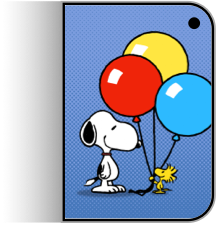
The asset catalog helps with verification. Next to the icon is an image called shutterbuddy_menu_content: Snoopy and Woodstock with balloons on a blue halftone background that matches blanket. That is a finished render of the effect, so I had something to compare against.
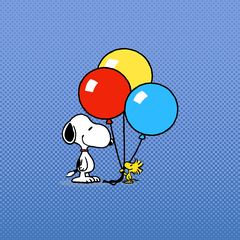

blanketThe recreation is a small Python script. It tiles the 82-pixel-wide template across the width, stretches it to the height, and maps black to the dot colour and white to the background colour:
python3 background/make_background.py out.png 1024 1024 '#4677BB' '#7A9BDE'The result is close. The dot pitch is approximate, because I do not know how the app scales the template. Then I composited the 15 transparent animations over backgrounds. The app picks a colorway per session, and I do not know how it chooses, so the pairing in my renders is arbitrary and only there for the demo.
The repo
Everything is in imjac0b/kidcue. It holds:
- the 15 raw
.heicsfiles and the template, fromCamera.app - the CameraUI asset catalog that contains the icon
- the icon, the menu reference, and a swatch for every colorway
- the palette as JSON, plus the scripts that rebuild the background
- 1024px renders of every animation, as WebM with transparency and as H.264 MP4 over a colorway
GIFs and WebPs of the full-size renders came to about 270 MB, so I kept only WebM for the transparent versions and MP4 for the composited ones. That brought the working tree down to 67 MB.
The media on this page loads from that repo through jsDelivr.
The characters are Peanuts property and the files are Apple’s, so I treat the repo as research material. I would not ship any of it in an app.